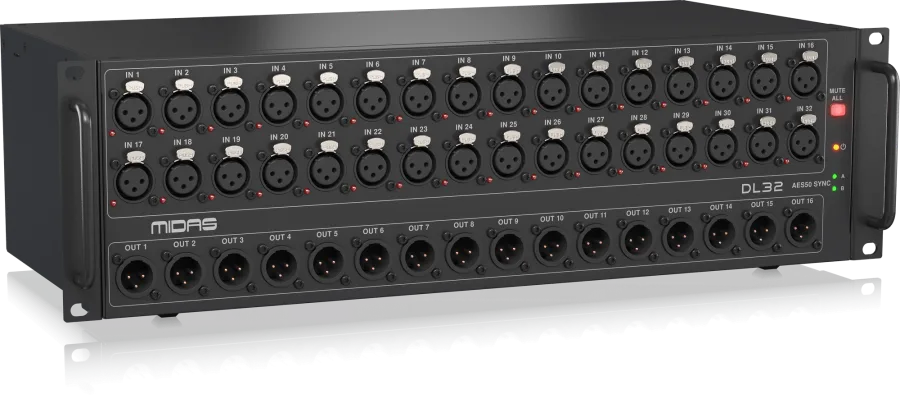
A digital stage box is one of the best upgrades you can make to a show. Instead of a heavy analog multicore running from stage to FOH, one shielded Cat5e cable carries every input and return. The Midas DL32 and the AES50 protocol are the standard way to do this on the M32 platform. Here's how to set it up so it just works.
What AES50 is
AES50 is a digital audio networking standard used by Midas and Klark Teknik. On the M32 platform:
- Each AES50 port carries 48 channels in each direction at 48 kHz
- It runs over Cat5e cable — but not just any Cat5e
- It carries clock along with the audio, so devices on the link stay in sync
- The console can remotely control the preamps in the stage box
An M32R or M32C has two AES50 ports, labeled A and B. A DL32 has two as well.
The cable is the most important part
Most AES50 problems come down to cable. Use:
- Shielded Cat5e (often labeled STP or F/UTP) with shielded connectors
- etherCON connectors on both ends for a locking, rugged connection
- A single continuous run — avoid couplers and patch panels in the middle when you can
- Runs of 100 m or less
Unshielded office network cable may work on a quiet bench and then click, pop or drop out in a venue full of lighting dimmers, LED walls and static from a crowd. Always carry a spare cable of the same length.
Basic setup: one console, one stage box
- Place the DL32 on stage near the input positions, usually stage left or right, with power and space for sub-snakes.
- Run shielded Cat5e from the DL32's AES50 A port to the console's AES50 A port.
- Set the clock. Normally the console is the clock master running at its internal clock, and the DL32 syncs from the AES50 link. Check the sync settings on both devices.
- Confirm the link. The console will show the AES50 connection as active; the DL32's indicators will show a stable sync.
- Route inputs. In the console's routing, assign the AES50 A inputs to your channels — for example, AES50 A 1–32 to channels 1–32.
- Route outputs. Assign mix buses, matrices or direct outputs to the AES50 A outputs that feed the DL32's 16 XLR returns.
- Line check every channel from the stage end before soundcheck.
Adding a second stage box
Need more inputs? Use AES50 B on the console for a second stage box, or cascade from the first DL32's B port, depending on how you want to route. With an M32R, you can combine local preamps and up to two stage boxes. Map them clearly in the routing and label channels as you go.
A common configuration is one DL32 shared by a FOH console and a monitor console, linked over AES50. Both consoles receive the same inputs, which is efficient — but only one console should control the preamp gain. If both engineers adjust gain, they fight each other.
- Decide which console is the gain master (often monitors, since in-ear performers are most sensitive to changes)
- The other console uses its digital trim to adjust its own levels without touching the analog preamp
- Agree on clocking: one clock master, everything else synced
Clocking, simply
Every digital device on a link needs to run in sync. If two devices are both trying to be master, or one is set to sync from a port with nothing connected, you'll get clicks, pops or no audio at all.
- One clock master per system
- Everyone else syncs from AES50
- If you add a recording interface or playback device on a digital connection, check its clock settings too
Power and placement
- Give the DL32 clean, dedicated power — not the same circuit as lighting
- Keep it off the floor if possible, and out of the path of drinks and foot traffic
- Leave room to see the front panel indicators during the show
- Keep the AES50 cable run away from power cables where possible, and don't coil excess cable tightly next to dimmers
Troubleshooting
| Symptom | Likely cause |
|---|
| No link at all | Wrong port, damaged connector, or a cable that's too long |
| Occasional clicks or pops | Unshielded cable, a coupler, or clock conflict |
| Dropouts when the crowd arrives | Static or interference on unshielded cable |
| Audio present but wrong channels | Routing not mapped to AES50 A or B correctly |
| One engineer's gains keep moving | Two consoles both controlling preamps |
When in doubt, swap to the spare cable first. It fixes more problems than anything else.
Planning your rental
Tell your rental company:
- Your input and output counts, so they can recommend one or two stage boxes
- The cable length from stage to FOH (and to monitors), measured along the actual cable path, not in a straight line
- Whether FOH and monitors will share the stage box
- What else will connect digitally: recorders, playback, broadcast feeds
We rent the DL32 with the M32R and M32C across Greater Los Angeles. Not sure which configuration you need? Read M32R vs. M32C + DL32, or send us your input list.