Skip to content
PARIS
BACKLINE
BACKLINE & AUDIO RENTAL
LOS ANGELES, CALIFORNIA

Renting a Nord Stage 3: What Keyboard Players Should Know

Everything to sort out before renting a Nord Stage 3 for a show: backups and Nord Sound Manager, piano and sample libraries, pedals, stands, outputs and the questions to ask your backline company.

By Paris Backline · · 3 min read
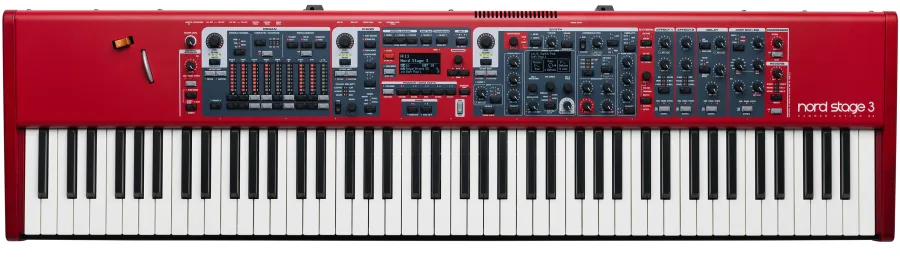
Nord Stage 3

Few instruments appear on more touring riders than the red Nord Stage 3. Its piano, organ and synth sections cover nearly every keyboard part in modern music, and the workflow is familiar to most working players. That's exactly why it's so easy to rent: if you bring your sounds, a rented Stage 3 can feel like your own within minutes.

Why the Stage 3 is a rider favorite

  • Three engines in one instrument: piano, organ and synth sections that can be layered and split
  • Familiar hands-on layout: most players can find what they need without menu-diving
  • Program-based workflow that loads from a single backup
  • Seamless transitions when switching programs, so held notes and effects tails don't cut off

Our Nord Stage 3 has an 88-note weighted hammer-action keybed — the version many piano-first players prefer.

Your sounds are the most important thing you bring

A rented keyboard doesn't have your programs on it. Plan ahead:

Make a backup

Use Nord Sound Manager (free from Nord) on a computer connected over USB to back up your Stage 3. A full backup captures your programs and the piano and sample libraries they use. Keep it:

  • On your laptop
  • In cloud storage
  • On a USB stick in your gig bag

Check the libraries

Nord pianos and samples come from the Nord Piano Library and Nord Sample Library. If your programs use a specific piano or sample that isn't on the rental instrument, it has to be loaded. A full restore from your backup normally takes care of this, but it takes time — do it before soundcheck, not during.

Budget restore time

Restoring a full backup can take a while depending on how much is loaded. Ask your backline company if you can get the instrument early, or send your backup in advance so it can be loaded before delivery.

Pedals: the item riders forget

The Stage 3 supports several pedal types. Be specific:

  • Sustain pedal: Nord's own sustain pedal, or a compatible piano-style pedal. Some players need half-pedaling — say so.
  • Triple pedal: if you play sostenuto and soft pedal parts, request a Nord Triple Pedal.
  • Expression/swell pedal: for organ volume and other control.
  • Rotor speed switch: for organ players who want a footswitch for the rotary effect.

Polarity and pedal type are set in the instrument's menu. Check them during line check.

Stands and ergonomics

An 88-key weighted keyboard is long and heavy. Ask for a stand that suits the instrument and how you play:

  • Double-braced X stand: common and portable, but can wobble with heavy playing
  • Z stand or table-style stand: sturdier, better for stacking a second keyboard
  • Two-tier stand: if you're stacking a second keyboard or controller
  • Bench or stool at the right height if you play seated

Outputs, DI and monitoring

The Stage 3 has four audio outputs, so you can send different sections to separate channels — for example, piano in stereo and organ in stereo. Plan accordingly:

  • Most shows need two DI boxes for a stereo pair; four if you're splitting sections
  • Some players use a monitor input to bring a click or another source into their headphones
  • If you're on in-ears, your keys come back in your IEM mix; see our IEM setup guide

Tell the FOH engineer how many outputs you're using so the input list matches.

MIDI and other keyboards

If you control a laptop rig, a second keyboard or a module, bring the right cables — USB or 5-pin MIDI — and confirm your laptop's software recognizes the Stage 3. Allow time to test patch changes before soundcheck.

Questions to ask your backline company

  1. Which model is it — 88 hammer-action, 76 or Compact?
  2. Can I get it early, or send my backup to be loaded?
  3. Which pedals and stand come with it?
  4. How many DI boxes will be at my position?
  5. Is there power at the keyboard position?

A quick show-day routine

  1. Restore your backup, or confirm your programs are loaded.
  2. Check pedal polarity and type.
  3. Play through every program in the set.
  4. Confirm each output at the console.
  5. Save your settings, and leave the instrument powered while you wait.

Playing a show in Los Angeles? We rent the Nord Stage 3 across Greater LA with delivery and on-call support. Send us your rider — including pedals and stand — and we'll have it ready.

How to Read a Tech Rider and Turn It Into a Backline Order

A section-by-section guide to reading an artist's technical rider — input lists, stage plots, monitor and wireless requirements — and turning it into a clear, complete backline rental order.

Fly Dates in Los Angeles: How Touring Acts Source Backline

Playing a one-off show in LA? How fly dates work, what touring acts carry vs. rent, how to advance backline, and the logistics of load-in, delivery and pickup across Greater Los Angeles.

Rent or Own? How Touring Artists Decide What to Carry

Freight, airline fees, insurance, wear and time all shape what a touring act carries and what it rents. A practical framework for deciding which backline and audio gear to own and which to rent on the road.